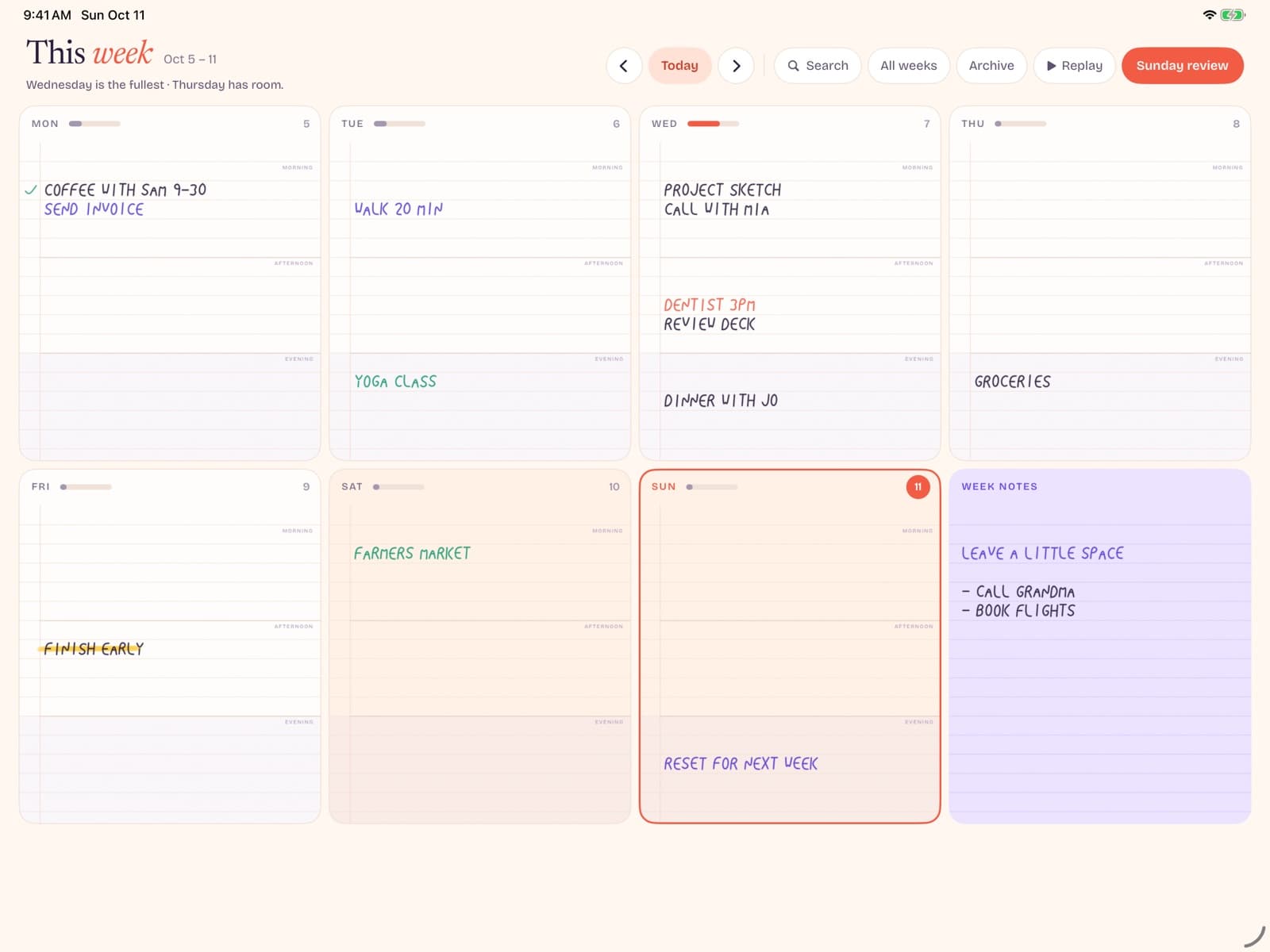
An undated weekly planner lets you open a fresh week whenever you are ready — not whenever the printed calendar says you should. On iPad, that same idea pairs cleanly with Apple Pencil: write the week by hand, skip unused pages, and keep the layout as bare as the work allows.
Key takeaways
- Undated weekly planners remove date guilt: you only open a spread when you actually use it.
- U.S. search demand for "undated weekly planner" is about 1,600 searches per month (Ubersuggest, United States, July 2026), with SEO difficulty around 26/100 — mostly paper-product results today.
- Broader "digital planner for iPad" interest runs near 2,400 monthly searches (Ubersuggest), so iPad + Pencil is a strong digital angle paper shops rarely cover well.
- Choose handwriting-first tools if you want the feel of paper without PDF template sprawl or subscription lock-in.
What is an undated weekly planner?
A classic dated planner pre-prints Mondays, months, and years. Miss a week of travel or illness and you stare at empty, "wasted" pages. An undated planner (sometimes called dateless or non-dated) leaves the week blank except for day columns or labels you fill yourself.
An undated weekly plannerspecifically uses a Monday–Sunday (or Sunday–Saturday) spread as the core unit. You get enough structure to see the whole week, without locking you into a calendar year. Related searches like "undated planner" (~5,400 U.S. monthly searches) and "undated daily planner" (~1,300) show people shopping this flexibility across formats — weekly is the sweet spot when your life is task + appointment heavy but not hour-by-hour.
On paper, brands from JetPens' undated planner roundup to Moleskine dominate search results. On iPad, the same need shows up as people looking for a digital planner for iPad they can write on with Apple Pencil — not another cloud calendar with colorful widgets.
Why weekly beats daily for most people
Daily pages feel productive until they don't. Many weeks only need a few meaningful notes per day; a daily book then becomes 80% blank paper. A weekly spread answers three questions on one view:
- What must happen before Friday?
- Where are the open blocks?
- What can wait until next week?
That is why "ipad weekly planner" searches stay transactional even at smaller volume (~70 U.S. searches/month): the buyers already know the format. They want the week, not a productivity OS. If you outgrow weekly, you can still keep a thin notes column for parking-lot ideas — without switching to a dated daily brick.
Paper vs digital undated planners on iPad
Paper undated planners win on tactility and zero battery anxiety. Digital wins on portability, undo, and one device for reading + writing. The honest comparison for iPad owners:
| Factor | Paper undated | iPad + Pencil |
|---|---|---|
| Start anytime | Yes | Yes |
| Carry weight | Book + pen | Device you already own |
| Undo / erase | Limited | Native |
| Template clutter | Fixed layouts | Depends on the app |
| Ongoing cost | New book each year | Free tier or one-time unlock |
Most "digital planner iPad" options are PDF stickers inside GoodNotes or Notability. They work — and "goodnotes weekly planner" still draws niche search — but you inherit template shopping, hyperlink mazes, and subscription ecosystems. If your goal is simply an undated week you can write on, a purpose-built iPad weekly planner is less ceremony.
Planning with Apple Pencil (why handwriting still wins)
Typing into calendar apps is fast for meetings. Handwriting is better for thinking: priorities, scribbles, arrows, and half-formed plans. Apple documents how PencilKit keeps low-latency ink on iPad; the practical takeaway for planners is simple — native PencilKit strokes feel closer to paper than remote "AI note" layers that reinterpret what you wrote.
Search phrases like "best planner app for iPad with pencil" (~170 U.S. monthly searches, SEO difficulty ~21 on Ubersuggest) cluster around that handwriting intent. People are not asking for another AI coach. They want ink that keeps up.
A bare undated weekly layout helps: day columns, optional notes gutter, no gamified streaks. Write the current week, then swipe when you need the next one.
How to choose an undated weekly planner (checklist)
Use this checklist before you buy another PDF pack or paper book:
- Undated by default — you should never burn a week you skipped.
- True weekly spread — all seven days visible without endless scrolling.
- Handwriting-first — Apple Pencil should feel primary, not bolted on.
- Offline OK — planning should work on a plane.
- Honest pricing — prefer free-to-try and a one-time unlock over a monthly template club. Bareweek Pro, for example, is a $12.99 lifetime unlock — free writing for this week and next (other weeks stay readable), then one purchase.
- No AI tax — if you did not ask for summaries, you should not fund them.
Coming soon
The bare undated weekly planner for iPad.
Write with Apple Pencil. Free writing for this week and next — other weeks stay readable. Pro unlocks unlimited weeks once — no subscription.
A simple weekly ritual (that survives busy seasons)
Undated planners fail when the ritual is vague. Use a short cadence you can keep during your worst month, not your most inspired Sunday.
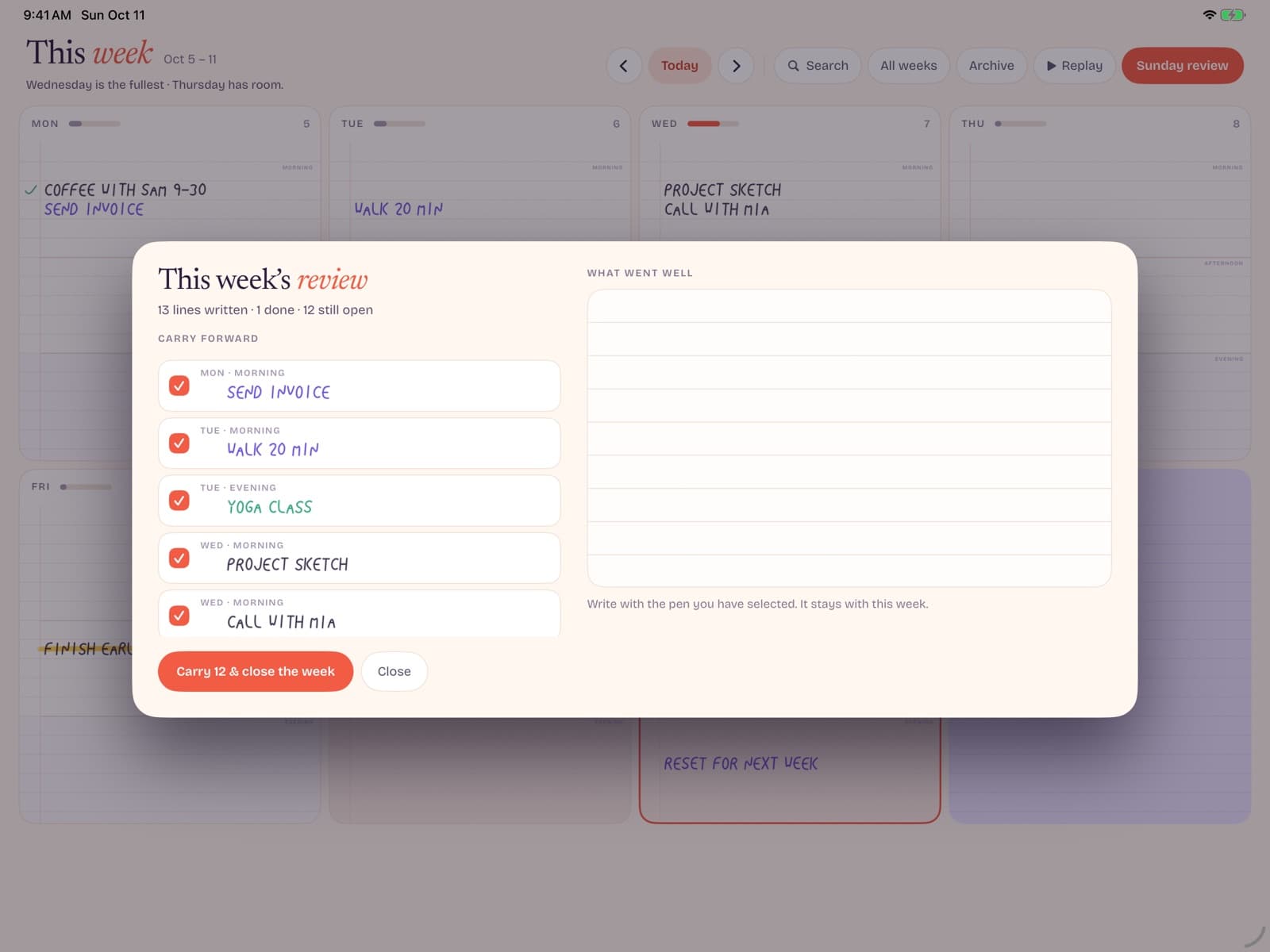
Open (8–12 minutes).Write the week's date range by hand if you want orientation. List three outcomes that would make the week successful. Place time-bound commitments lightly — a box or underline is enough when the calendar already owns the invite.
Daily touch (2–4 minutes). Mark the next action. Cross out what died. Resist rewriting the entire day unless reality changed. The undated advantage is psychological permission to continue after messy days; do not spend that permission on calligraphy resets.
Close (5 minutes). Migrate only unfinished work that still matters. If an item has rolled three weeks, rewrite it as a smaller next step or delete it. Infinite digital pages make hoarding unfinished ambitions too easy.
Layout patterns that work on iPad
Vertical day columns are the classic weekly spread and map well to landscape iPads. Horizontal time grids help chronotypes who think in hours, but they can fight freeform handwriting. A hybrid works for many people: columns for days, plus a narrow notes gutter for parking lots and grocery chaos.
Color can encode weekends or energy, but keep the palette tiny — one accent for weekends is enough. Too much color coding becomes another system you must maintain. If you need accessibility contrast, prefer stronger ink against paper-like backgrounds instead of pale gray on pale gray.
Zoom strategy matters. Write details zoomed into a day, then pinch out to confirm the week still balances. Apps that lose stroke quality when zooming are poor weekly companions.
Myths about undated planning
Myth: undated means unstructured. Undated removes pre-printed dates, not structure. Day columns are structure. Outcomes are structure. The difference is permission to begin on a Wednesday without wasting Monday and Tuesday pages.
Myth: digital undated planners are only for aesthetic PDF collectors. Template culture is loud online. Plenty of people want a boring week that works. Boredom can be a feature.
Myth: if you skip a week, you failed. Skipping is data. Maybe the planner is too heavy. Maybe life spiked. Undated systems let you resume without a fake catch-up week that nobody will read.
What search demand implies for product design
Ubersuggest demand for undated weekly formats sits beside even larger interest in generic undated planners. That suggests buyers understand date flexibility and are shopping for the right unit of time. Weekly wins when people need overview without daily page bloat; daily wins for hour-level journaling; monthly wins for big-picture mapping.
Meanwhile, SERP results for undated weekly planner still skew to paper brands. Digital handwriting tools that speak plainly about undated weeks have room to explain the iPad angle — Apple Pencil latency, undo, and pocket weight — without pretending to be a paper replica in every aesthetic detail.
If you are comparing options next, continue with digital planners for iPad or best planner apps for iPad.
Travel, burnout, and irregular seasons
Undated weekly planners shine when life stops resembling a tidy office calendar. Travel weeks scramble day names. Burnout weeks need fewer commitments, not fake productivity theater. Caregiving weeks rearrange themselves hourly.
In those seasons, dated pages become accusations. An undated spread becomes a container: write what happened, what remains, and what can wait. On iPad, undo and portability help when plans change twice before lunch. Keep expectations humane — a successful travel week may contain three outcomes, not twelve.
If you return from disruption, do not backfill every missed day to make the book look complete. Start a clean undated week. Completeness theater is how people quit.
Personal planner vs team planning
An undated weekly planner is usually a personal instrument. Team deadlines still belong in shared trackers. Confusion starts when you hide commitments only your teammates need inside a private notebook, or when you flood a personal page with every Slack-driven microtask.
A practical split: shared tools for coordination, personal weekly pages for prioritization and recovery. Write the team deadline once as a marker, then use handwriting for the prep work only you can sequence. This keeps Bareweek-like tools complementary to Asana/Jira/ Linear rather than competitive with them.
Buying checklist for 2026
- Confirm undated weeks before you fall for cover art.
- Test Apple Pencil writing for ten continuous minutes.
- Check offline behavior on airplane mode.
- Read the paywall: free weeks vs one-time unlock vs subscription.
- Decide where long notes live so the week stays a week.
- Commit to a 14-day evaluation before buying add-on templates.
If you want the shortest path, try Bareweek when it launches — write this week first, then decide whether Pro's unlimited weeks matter for your horizon.
What to write in each day column
People freeze in front of blank undated columns. Use a lightweight grammar:
- One headline outcome at the top of the day.
- Two supporting actions maximum unless the day is truly administrative.
- One recovery note — meal, walk, sleep target — especially on overloaded weeks.
- Open loops go to the gutter, not the day, until scheduled.
This grammar keeps handwriting legible and prevents the weekly spread from becoming a diary dump. If you need diary depth, give it a separate note page. The week should remain scannable from arm's length.
On weekends, allow softer outcomes: errands clustered, rest named explicitly, social plans with travel buffers. Undated pages are ideal here because weekend energy varies more than office mythologies admit.
If a day fails, annotate why in five words ("migraine," "outage," "kid sick") and move on. Pattern recognition across weeks is more valuable than performative catch-up pages.
Students and first-time planner users
First-time planner users often copy maximalist spreads and quit. Start smaller than you think: seven day labels, three weekly outcomes, and a notes gutter. Add habit trackers only after two stable weeks.
Students should separate syllabus truth from personal planning. Put official due dates in a calendar or LMS, then use the undated week to sequence study blocks you control. That prevents the planner from becoming a second broken copy of the syllabus.
Parents helping teens: co-create the first week together, then step back. Ownership matters more than perfect layout. An undated iPad week the student will open beats a gorgeous paper system abandoned in a backpack. Review together once a week at most — coaching, not surveillance of every scribbled box.
Conclusion
If you searched for an undated weekly planner, you already rejected the idea that every blank day must be a failure. On iPad, that philosophy fits Apple Pencil handwriting better than subscription-heavy digital planner kits. Keep the week bare, write what matters, and open the next spread only when you need it.
Dated systems sell the fantasy of a perfectly used year. Undated systems sell continuity. Continuity is what compounds — not flawless January spreads abandoned by February. Whether you choose paper or iPad, protect that continuity first.
Ready to try it? email us about Bareweek or review Bareweek pricing — we'll tell you when you can open this week and write.