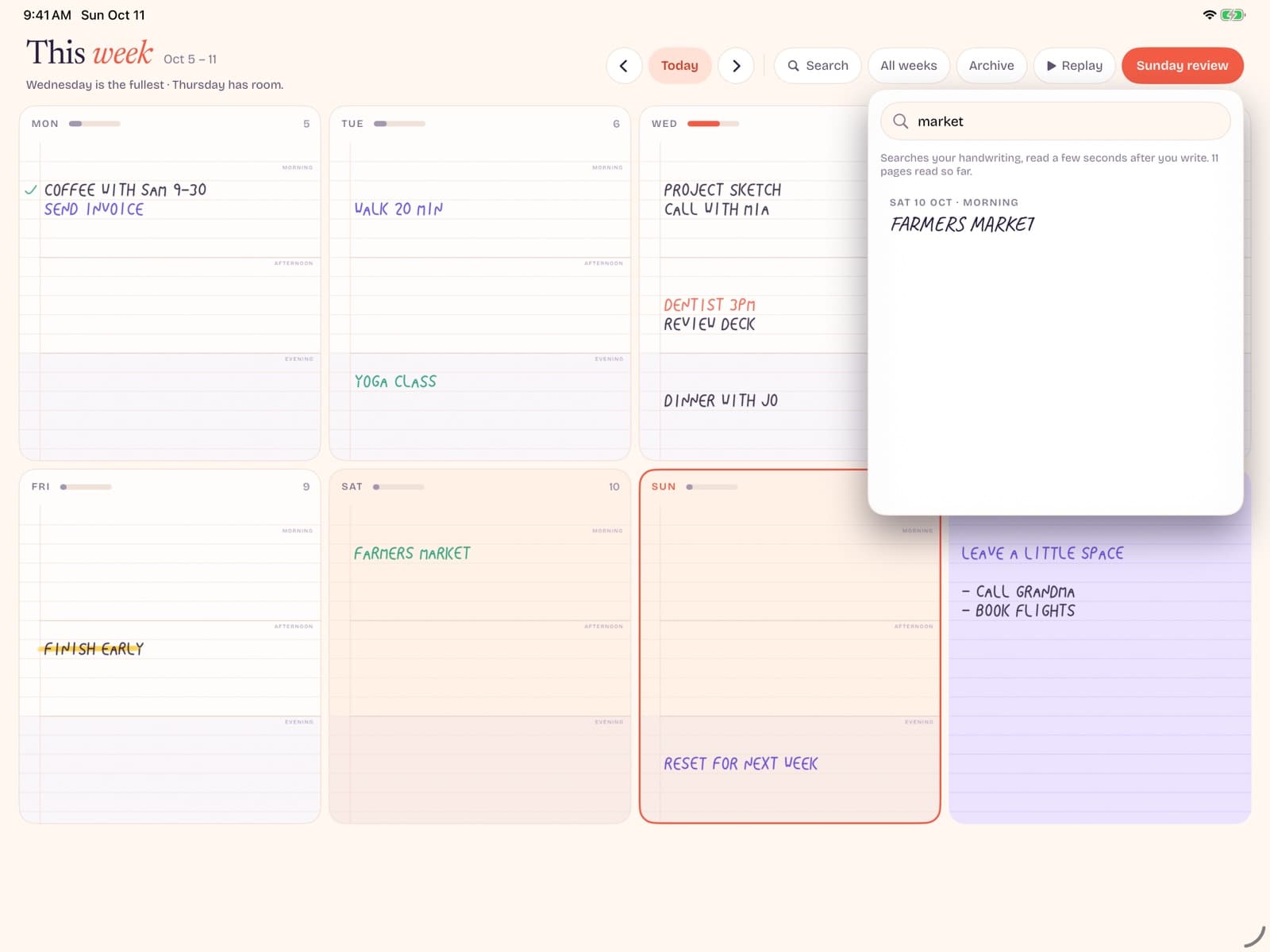
GoodNotes vs Notability is one of the most searched iPad note comparisons — about 6,600 U.S. monthly searches with relatively low SEO difficulty (~17) per Ubersuggest (July 2026). For planning specifically, the better question is whether either app should be your weekly planner home, or whether a dedicated undated canvas is cleaner.
Key takeaways
- Both GoodNotes and Notability are excellent handwriting notebooks. Planning is a secondary use case they support via folders and PDF templates.
- GoodNotes often wins on notebook organization and marketplace-style planner PDFs. Notability often wins on audio + note sync for lectures and meetings.
- If your primary job is an undated weekly overview, a purpose-built planner can beat both on speed and calm.
- Many people should keep GoodNotes/Notability for notes and use a separate weekly planner for priorities.
Quick verdict
Choose GoodNotes if you want a library of notebooks, stickers, and hyperlinked planner PDFs with strong visual customization. Choose Notability if you regularly record lectures or meetings while writing, and want that audio tied to notes.
Choose neither as your only planner if you keep abandoning decorated dashboards. In that case, a bare undated weekly planner — like Bareweek — can hold the week while your note app holds the archive.
This is not a dunk on either product. They are category leaders for iPad handwriting. The planning failure mode is usually workflow design: too many templates, too many trackers, no weekly spine.
Key differences for planning
| Planning need | GoodNotes lean | Notability lean |
|---|---|---|
| Hyperlinked planner PDFs | Very common workflow | Works, less template-centric culture |
| Stickers / decorative kits | Strong marketplace habit | Possible, often simpler setups |
| Lecture/meeting audio + notes | Capable | Signature strength |
| Minimal undated week only | Easy to overbuild | Easy to overbuild |
| Search across large archives | Strong notebook library feel | Strong for note+audio corpora |
For pure planning, the decisive difference is cultural more than technical. GoodNotes communities share elaborate digital planner setups. That inspiration helps some users and overwhelms others. Notability users often arrive from classroom audio workflows and bolt planning on afterward.
Neither app stops you from creating a single undated weekly template and using only that. Discipline is on you. If you struggle with discipline around customization, software with fewer customization surfaces can be a feature.
Using planner PDFs inside each app
A typical PDF planner includes a cover, undated or dated months, weekly spreads, habit trackers, and linked tabs. Done well, it feels like a book. Done poorly, it becomes a maze of tap targets and unused pages.
If you go this route in GoodNotes or Notability:
- Buy (or create) one undated weekly-focused template first.
- Disable or ignore extra trackers for the first month.
- Duplicate a fresh week copy instead of fighting pre-filled dates when possible.
- Keep meeting invites in a real calendar app; do not hand-copy every event into the PDF.
- Review storage: large sticker-heavy notebooks grow quickly.
Search interest in phrases like "goodnotes weekly planner" shows this workflow is real — but volume is niche compared with the GoodNotes vs Notability comparison itself. Many searchers compare apps first, then discover planner PDFs later.
For a broader shopping frame, see digital planners for iPad and best planner apps for iPad.
When neither is the right planner
GoodNotes and Notability are notebooks. Planners are a subset of what notebooks can pretend to be. You may want a dedicated planner when:
- You open the note app and lose the week inside folders.
- Template shopping became a hobby that displaces planning.
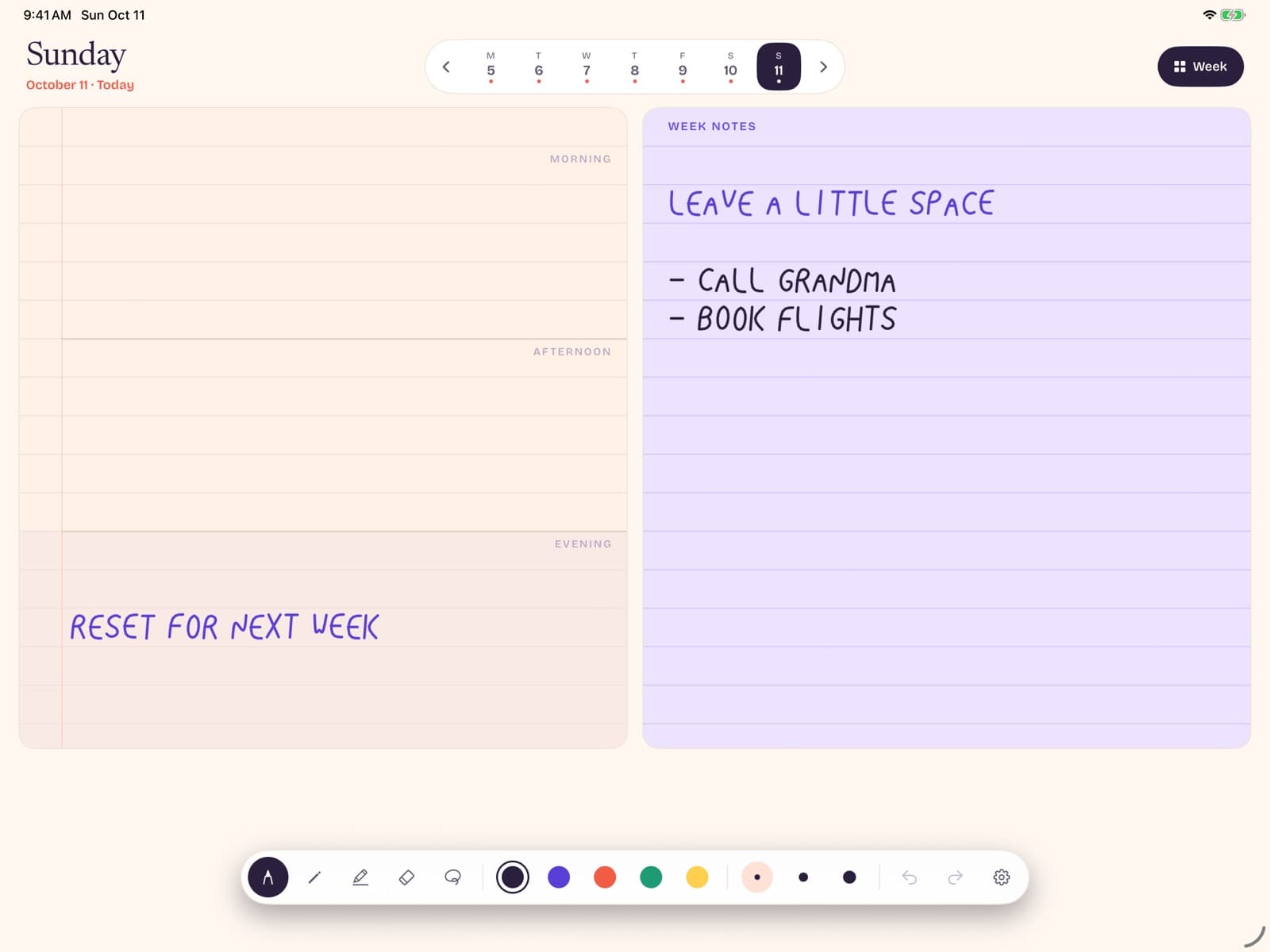
- You only need Monday–Sunday columns and a notes gutter.
- You want undated weeks without managing PDF duplicates.
- You want planning to work offline with a simple pricing story.
In those cases, a handwriting-first weekly app reduces decision load. Bareweek, for example, opens to today's page — not a library browser — and keeps Pro as a one-time unlock after free writing for this week and next (other weeks stay readable).
You can still keep GoodNotes or Notability for class notes, sketching, and document markup. The win is separation of concerns: archive vs agenda.
Coming soon
Keep notes in your note app. Keep the week bare.
Bareweek is an undated weekly planner for iPad and Apple Pencil — complementary to GoodNotes or Notability, not a replacement for lecture notes.
Choosing and migrating
If you are undecided between GoodNotes and Notability, pick based on your dominant capture mode for the next 90 days — not forever. Audio lectures tip Notability. Template-heavy planning culture tips GoodNotes. Switching later is annoying but survivable if you migrate only active notebooks.
If you are leaving both as a planner home, migrate lightly:
- Screenshot or export the current week only.
- List active projects once in the new weekly notes column.
- Leave historical PDFs where they are as an archive.
- Do not rebuild every tracker on day one.
Also revisit Apple's iPad User Guide for Pencil basics. Bareweek itself is full-screen and landscape-only (no Split View) — for multitasking, keep calendar in another app and switch, or use a separate device for the clock.
Sample setups that do not collapse
Setup A: GoodNotes as archive, Bareweek as week
Store lecture PDFs, meeting packets, and long-form notebooks in GoodNotes. Open Bareweek each morning for the undated week. This prevents your planner from drowning in course materials. Search lives in GoodNotes; priorities live on the week.
Setup B: Notability for classes, minimal PDF planner
Record lectures in Notability and keep a single undated weekly PDF in a separate subject/notebook. No stickers for month one. If you still crave decoration after four stable weeks, add one sticker sheet — not five.
Setup C: One app only
If you refuse two apps, create a "Planner" notebook pinned at the top and a hard rule: no lecture notes inside it. The failure mode is subtle — one dump folder for everything — so pinning and naming conventions matter more than template art.
Collaboration limits
Neither GoodNotes nor Notability replaces a shared team planner for most workplaces. If multiple people must edit the same week, use a collaborative doc or calendar and keep personal handwriting private. Trying to share decorative planner PDFs as a team OS creates version conflicts and awkward privacy boundaries.
For households, a shared grocery list app plus personal weekly planners usually beats one shared GoodNotes notebook that nobody wants to open.
Export, backup, and long-term ownership
Before you invest months of handwriting, practice an export. Can you get a PDF of a notebook? Does backup require a paid cloud tier? What happens if you cancel?
Ownership anxiety is rational. Notes apps improve, rebrand, and change pricing. Keep occasional PDF snapshots of critical weeks (tax notes, medical timelines, contract negotiations). You will rarely need them — and you will be grateful when you do.
Dedicated planners with local-first storage shift the risk toward device backup hygiene instead of vendor lock-in. That is a different risk, not zero risk. Align it with how you already back up your iPad.
Decision tree
- Do you regularly record audio while writing? If yes, start with Notability.
- Do you want hyperlinked sticker-heavy planner PDFs? If yes, start with GoodNotes.
- Is your main pain "I cannot see my week"? If yes, trial a dedicated undated weekly planner before building another dashboard.
- Are you undecided and exhausted? Pick one note app for capture and Bareweek for the week. Reassess in 14 days.
The goal is not winning an internet argument about GoodNotes vs Notability. The goal is a week you can trust by Thursday afternoon.
Total cost of ownership (beyond the sticker price)
People compare GoodNotes vs Notability on entry price and miss the stack: cloud tiers, template packs, sticker books, time spent reorganizing notebooks, and the opportunity cost of another Sunday redesign. A cheaper app with expensive habits can cost more than a focused planner with a clear one-time unlock.
Estimate your last 90 days honestly. How many hours went to decorating or migrating? How many weeks were actually planned? If hours-to-setup exceeds hours-of-use, the ecosystem is entertaining you, not serving you.
Also budget attention. Notification-heavy suites tax focus. A quiet weekly canvas has fewer hooks — which is exactly why it can feel "too simple" in screenshots and "finally usable" on a Wednesday.
Why handwriting still matters on glass
You do not need a neuroscience degree to notice that writing by hand slows thinking just enough to filter noise. On iPad, that benefit only appears when latency is low and tools stay out of the way. If every sentence requires menu taps, you will bounce to typing — and then wonder why the planner feels like email.
GoodNotes and Notability both can deliver that handwriting state for notes. Planning adds a spatial requirement: the week must remain visible as a map. Infinite vertical note scrolls fight that map. This is the core reason a dedicated weekly layout can outperform a general notebook even when the notebook has better brand recognition.
If you love longform handwriting, keep it. Just stop forcing longform tools to be your only weekly cockpit.
Community advice: use it carefully
Reddit threads, YouTube tours, and TikTok planner flips are useful for discovery and dangerous for identity shopping. You can spend a weekend watching setup videos and call it productivity. It is entertainment with better lighting.
When you watch a GoodNotes vs Notability comparison, mute the aesthetic score for a moment. Ask what job the creator actually finished that week. If the video never shows a midweek messy page, you are seeing a showroom, not a workshop.
Steal one idea maximum per month. Implement it. Keep it only if your Thursday self still likes it. Communities optimize for inspiration velocity; your life optimizes for repeatable calm.
The healthiest community use is troubleshooting: palm rejection quirks, export steps, Pencil hardware tips. The unhealthiest is competitive customization. If you feel behind because your week is plain, that is usually a signal you are finally doing the work.
A durable hybrid stack
Here is a stack that survives most knowledge-work lives:
- Apple Calendar or Google Calendar for invites and reminders.
- GoodNotes or Notability for lasting notes and documents.
- An undated weekly planner for priorities and recovery.
- One task list for mechanical checkboxes if you need it.
Four tools sound like more complexity. In practice, each tool has a crisp job, which reduces the urge to overbuild any single one. The week stops pretending to be a CRM. The notebook stops pretending to be a calendar. Meetings stop pretending to be priorities. Keep the hybrid boring on purpose — boredom is often the sound of a system that finally fits your real week, not an idealized one from YouTube.
Conclusion
GoodNotes vs Notability is a real choice for iPad handwriting — and a partial choice for planning. If you love PDF planners, pick the ecosystem you will customize. If you want a calmer weekly spine, keep your note app for notes and put the week in a dedicated undated planner.
Both apps can be excellent long-term homes for documents and study. Neither must be forced into every job on your iPad. The moment planning becomes a side effect of notebook sprawl, split the stack and give the week its own front door.
Try the bare path with email us about Bareweek, or continue comparing options in our best planner app for iPad guide.